Jekyll2024-05-12T10:36:20+00:00https://winnercrespo.com/feed.xmlWinner CrespoI'm a software engineer willing to learn more every day. Let's keep in touch so I can share with you my knowledge and I can learn from you as well.Winner Crespowistcc@gmail.comIntroducing gameflix.app - Wordle for Netflix2024-05-12T00:00:00+00:002024-05-12T00:00:00+00:00https://winnercrespo.com/gameflixIf you’re anything like my wife and me, then you know the thrill of diving deep into the Netflix catalog, debating over the best shows and movies, and occasionally engaging in friendly competitions to prove who’s the true Netflix guru. It was during one of these heated debates that the idea for Gameflix was born – a game that combines our love for Netflix with a bit of friendly competition.
Picture this: You and your partner, cozying up on the couch, remote in hand, ready to embark on a journey of Netflix discovery. But this time, there’s a twist. Instead of mindlessly scrolling through titles, you’re about to test your Netflix knowledge in a whole new way – with Gameflix.
So, what exactly is Gameflix, you ask? Well, it’s like Wordle meets Netflix, but with a personal touch. Every day, you’re presented with a new challenge – guess the title of the featured Netflix show or movie using only a limited amount of information. It’s a game that’s as addictive as it is entertaining, and it’s been a labor of love for my wife and me.
Here’s how it works: You start by watching just two seconds of the trailer for the selected Netflix program. It’s a tantalizing glimpse that leaves you hungry for more. Then comes the crucial moment – do you make a guess or skip to the next phase of the game? Choose wisely, my friend, as each decision could bring you closer to victory or lead you further astray.
But fear not, because Gameflix has your back. With each incorrect guess or skip, you’ll receive additional seconds of the trailer and valuable hints about the program’s genre, director, and actors. It’s like your own personal Netflix treasure hunt, with plenty of twists and turns along the way.
And finally, after multiple attempts, you’ll have one last chance to make your final guess from a selection of options. It’s a nail-biting moment that will put your Netflix knowledge to the ultimate test.
But Gameflix isn’t just about winning – it’s about sharing unforgettable moments with the ones you love. Whether you’re playing with your partner, family, or friends, Gameflix brings people together in a shared love for Netflix and friendly competition.
So, what are you waiting for? Go and play Gameflix. Who knows, you might just discover your new favorite show along the way!
]]>Winner Crespowistcc@gmail.comLearning JavaScript from Scratch: Mastering Functions and Arrays (Part 2)2024-04-12T00:00:00+00:002024-04-12T00:00:00+00:00https://winnercrespo.com/js-part-2Hey there! Welcome back to our ongoing journey into the wonderful world of coding. In our first post, we laid down the groundwork by covering the basics of JavaScript syntax and structure. Today, we’re diving deeper into the language’s core features, focusing on functions, arrays, and more.
Functions: The Building Blocks of JavaScript
Functions are like little bundles of code that perform specific tasks. They’re incredibly versatile and can be used to encapsulate logic, promote code reusability, and maintain a modular codebase.
Declaring Functions
In JavaScript, you can declare functions using the function keyword. Here’s a simple example:
functiongreet(name){return'Hello, '+name+'!'}
Calling Functions
Once you’ve declared a function, you can call it whenever you need to execute its code. Here’s how you’d call our greet function from earlier:
In addition to function declarations, JavaScript also supports function expressions, which allow you to define anonymous functions on the fly. Here’s an example:
letadd=function(x,y){returnx+y}
Arrays: Handling Collections of Data
Arrays are a fundamental data structure in JavaScript, allowing you to store collections of data items. They’re incredibly versatile and can be used for everything from simple lists to more complex data structures.
Creating Arrays
You can create an array in JavaScript by enclosing a list of values within square brackets. Here’s an example:
letfruits=['apple','banana','orange']
Accessing Array Elements
You can access individual elements of an array using square bracket notation. Remember, array indices are zero-based, meaning the first element is at index 0. Here’s how you’d access the second element of our fruits array:
console.log(fruits[1])// Output: banana
Array Methods
JavaScript provides a variety of built-in methods for working with arrays. From adding and removing elements to sorting and searching, these methods make manipulating arrays a breeze. Here are a few examples:
push() and pop(): Add and remove elements from the end of an array.
shift() and unshift(): Add and remove elements from the beginning of an array.
splice(): Add, remove, or replace elements at specific positions within an array.
concat(): Concatenate two or more arrays.
indexOf() and lastIndexOf(): Find the index of a specific element within an array.
Putting It All Together: Practical Examples
Now that we’ve covered functions and arrays, let’s put our newfound knowledge to the test with some practical examples. How about we write a function that calculates the average of an array of numbers?
Congratulations! You’ve made significant strides in your journey to JavaScript mastery. But our adventure is far from over. In the next post of our series, we’ll explore more advanced JavaScript concepts, including objects, loops, and more.
Until then, keep coding, stay curious, and never stop exploring the wonderful world of JavaScript.
Happy coding!
Stay tuned for Part 3 of our “Learning JavaScript from Scratch” series, coming soon to a browser near you.
]]>Winner Crespowistcc@gmail.comLearning JavaScript from Scratch: A Beginner’s Guide (Part 1)2024-04-08T00:00:00+00:002024-04-08T00:00:00+00:00https://winnercrespo.com/js-part-1Hey there! Welcome to the first post of our exciting journey into the world of JavaScript. Whether you’re a seasoned developer looking to expand your skill set or a curious newbie eager to dive into the realm of programming, you’ve come to the right place.
JavaScript, often hailed as the “language of the web,” is a versatile and powerful tool that forms the backbone of countless websites and applications. From dynamic user interfaces to interactive web experiences, mastering JavaScript opens up a world of possibilities.
But hey, let’s not get ahead of ourselves. Before we start building the next big thing, let’s lay down some solid foundations. Today, we’ll kick things off by covering the basics:
Getting Started: Setting Up Your Environment
First things first, let’s ensure you have the necessary tools to code like a champ. You’ll need:
A Text Editor: Choose your weapon of choice—whether it’s Visual Studio Code, Sublime Text, or good old Notepad, make sure you have a reliable text editor at your disposal.
A Web Browser: JavaScript runs in the browser, so having a modern web browser like Chrome, Firefox, or Edge is essential for testing and debugging your code.
Understanding the Basics: Syntax and Structure
Now that we’re all set up, let’s dive into the nitty-gritty of JavaScript syntax. Don’t worry if you’re feeling a tad overwhelmed; we’ll take it slow and steady.
Variables and Data Types
In JavaScript, variables are used to store data values. They can hold various types of data, including:
Numbers: Used for numeric values (e.g., let age = 25;).
Strings: Used for textual data (e.g., let name = 'John';).
Booleans: Used for true/false values (e.g., let isAdult = true;).
Operators and Expressions
JavaScript supports a variety of operators for performing operations on variables and values. From arithmetic operators (+, -, *, /) to comparison operators (==, ===, !=, !==), mastering these tools is crucial for writing efficient code.
Control Flow: Making Decisions with Conditionals
Conditional statements allow your code to make decisions based on different conditions. From simple if-else statements to more complex switch statements, mastering control flow is key to writing dynamic and responsive code.
Putting It All Together: Your First JavaScript Program
Now that we’ve covered the basics, let’s put our newfound knowledge to the test. How about we write a simple JavaScript program that greets the user? Here’s a sneak peek:
// Welcome to JavaScript!letname=prompt("What's your name?")alert('Hello, '+name+'! Welcome to the world of JavaScript!')
Next Steps: Where to Go from Here
Congratulations! You’ve taken your first steps into the exciting world of JavaScript. But our journey is far from over. In the next post of our series, we’ll explore functions, arrays, and more advanced JavaScript concepts.
Until then, keep coding, stay curious, and never stop learning. Remember, the road to JavaScript mastery may be long, but with dedication and perseverance, you’ll get there.
Happy coding!
Stay tuned for Part 2 of our “Learning JavaScript from Scratch” series, coming soon to a browser near you.
]]>Winner Crespowistcc@gmail.comConsistency when working out is the key - More than 7 years working out2021-06-27T00:00:00+00:002021-06-27T00:00:00+00:00https://winnercrespo.com/consistency-is-the-key-more-than-7-years-working-outIf you would rather watch a video about it:
Nowadays if I spend a day without exercising, it just makes me think about the benefits that I am missing, things like the boosts in my creativity, the release of stress or the Increase of my energy levels, and don’t even get me started in how it has transformed my body, but honestly 7 years ago I would have never imagined that I would be here today talking to you about fitness.
Maybe because most of my life working out or having a healthy life, was not even a thing for me.
I’ve always been a chubby guy, so obviously, the first thing I tried when I started to think about fitness was to lose my belly fat and especially my chest fat. I remember I tried to go for a run from time to time, play basketball to make it fun, and of course do some abs workout. It didn’t last long.
Then I tried (many times) to lift some weights, since doing that I would be able to get a toner body and hopefully in the process also lose my chest and belly fat. I even did a 3 months program called “Operación cuadritos”/”Operation Abs” in preparation for the summer but again soon enough I got back to not do any workout at all.
I think the reason why I wasn’t able to make it stick was because I didn’t know about the things I’ll share with you today.
But first a disclaimer, I am not a fitness coach nor a professional athlete. I’m just a regular guy, doing regular stuff. Here, I am just sharing my experience about how working really hard, day in and day out, I am and have been able to reach my goals. Let’s continue.
Today I’ll share with you 4 steps I followed to finally make fitness part of my daily routine and the first one was to “discover the why”. As I told you before, at first my reason was specifically to look better. I found out the hard way that for me that was not enough. Looking better won’t make me run that extra mile, looking better won’t give me the motivation I need for the 2 extra repetitions and it wouldn’t either keep me from quitting when it is just super hard.
I remember when I first tried to do a push-up and I couldn’t do even one, but when l looked to my side, I saw my little sister doing several push-ups like it was just a natural thing to do and the feeling of being powerless to do what I wanted, stuck in the back of my head for many years.
In 2014, I decided to not feel powerless anymore and to take control of life in every sense including my body.
Nowadays, working out is just part of my routine just like eating, working, or spending time with family and friends, and it is just because now I don’t do it to get a toner body, I do it because I know it is super important to be able to live happier and hopefully longer and do all the things I love and plan to do.
The second step was to “Make it simple”. What I mean by this is that I needed to create a process that helps me come with the fewer excuses possible.
Something you may do to make it simple, is to choose something that you really like, it being basketball, football, volleyball, tennis, running, bicycle, cross country ski, dancing, chess boxing (yes, that is a sport, do not ask me) whatever it may be but something that you even do just for fun. For me, it was weight lifting.
Another thing is that I needed to plan ahead my workout. I started to decide before coming to the gym what exercises, sets, and repetitions I would do each day. I also started to get my workout clothes ready the night before and picked the nearest gym possible. Again, not giving me a chance to create excuses.
And lastly, start small. In the book The power of less, Leo Babauta says that 5-10 minutes a day is enough to start creating a habit, this way there’s a much lower possibility of making up excuses to not do it and I can assure you that after you create the habit you will feel the need of increasing this time.
The third step was “Set a time”. I’ve tried going to the gym early in the morning and this somewhat works but I am not always a morning person which means that I have skipped it many times just because I wanted to continue sleeping. I’ve tried it during my lunch breaks and also somewhat works but I always felt a bit stressed because I had to hurry back to work and sometimes I wasn’t able to do my workout as planned. I’ve also tried late in the evening and it does not work at all for me, at this time I am completely exhausted from the day and I am not able to do my best at the gym.
What has absolutely worked for me was something that I learned from the book Atomic Habits. There James Clear talks about habit stacking (he also has a blog post about it, that I will leave in the description). There a hire a lot of habits that we take for granted and do not think about them as habits. Let’s take me as an example, after I wake up the first thing I do is to brush my teeth, then I make coffee and then read a book. The way these habits are stacked makes it harder for me to forget to brush my teeth after waking up, for example.
I used this technique and started going to the gym right after work since getting out of the office gives me the perfect trigger to just automatically go to the gym, no excuses.
After you find the time that works best for you, you need to make sure to make it a priority and do not let anything come first. For me, it has been that my chosen time collides with social gatherings and my solution has always been to say “see you after the gym”.
And finally, the fourth step was “the two days rule”. I learned this a year ago from one of my favorite YouTubers Matt D’Avella and it was a game-changer, I’ll leave his video in the description. The two days rule basically says that I cannot skip my workout two days in a row, so if I miss working out today, that means that I must workout tomorrow.
Spending longer times without working out makes it more probable that we lose the habit, so sticking to the rule is crucial. I used to workout weekdays and get weekends off but sometimes I wasn’t able to work out on a Friday meaning that my next workout would be 3 days later and because of this I would lose my habit. With the two days rule is simple, I just need to remember “did I work out yesterday?” If no then I must work out tomorrow, no excuse.
These are the 4 steps that helped me stick to my fitness routine for more than 7 years and counting. Discover the why, make it easy, set a time, and follow the two days rule. Of course, this is not as easy as it sounds, very often life just happens (I get sick, I travel, coronavirus) but the best we can do is to just get back on track as soon as possible, at the end of the day this is a marathon, not a sprint so the important thing is to maintain the habit in the long run.
]]>Winner Crespowistcc@gmail.comWhat is CORS?2020-05-24T00:00:00+00:002020-05-24T00:00:00+00:00https://winnercrespo.com/what-is-corsHave you ever seen this error?
Access to fetch at 'https://www.test1.com' from origin 'https://www.test2.com' has been blocked by CORS policy: No 'Access-Control-Allow-Origin' header is present on the requested resource. If an opaque response serves your needs, set the request's mode to 'no-cors' to fetch the resource with CORS disabled.
If you have, it probably means that you have faced this problem before or that you are facing it right now. Either way, don’t worry, we will learn what is this error about together.
First of all, CORS stands for Cross-Origin Resource Sharing and I think that with this alone we could already start to understand the idea behind CORS. It is a mechanism to allows (or not) different origins (different websites, domains) to have access to resources on a server.
Let’s say that I have a service called musicinfo.com. Here I have 2 endpoints: one that is public, meaning anyone can do requests from any origin and get information about a song, and another one that is private, meaning that only requests made from https://www.musicinfo.com.
This is how those request would look like:
Request Headers
... Other headers
authority: www.musicinfo.com
method: GET
path: /song?name=one&artist=u2
origin: https://winnercrespo.com
Response Headers
... Other headers
Access-Control-Allow-Origin: *
As you can see, on the response we get Access-Control-Allow-Origin: * meaning that any origin is allowed to access this resource. Another way this could have worked is if we get Access-Control-Allow-Origin: https://winnercrespo.com meaning that this origin has access. What we get on the Access-Control-Allow-Origin is dictated by the server so it decides beforehand who has access to what resource.
On the other hand, if I try to do a request to the private endpoint from https://winnercrespo.com we would get a CORS error as we can see in the next example.
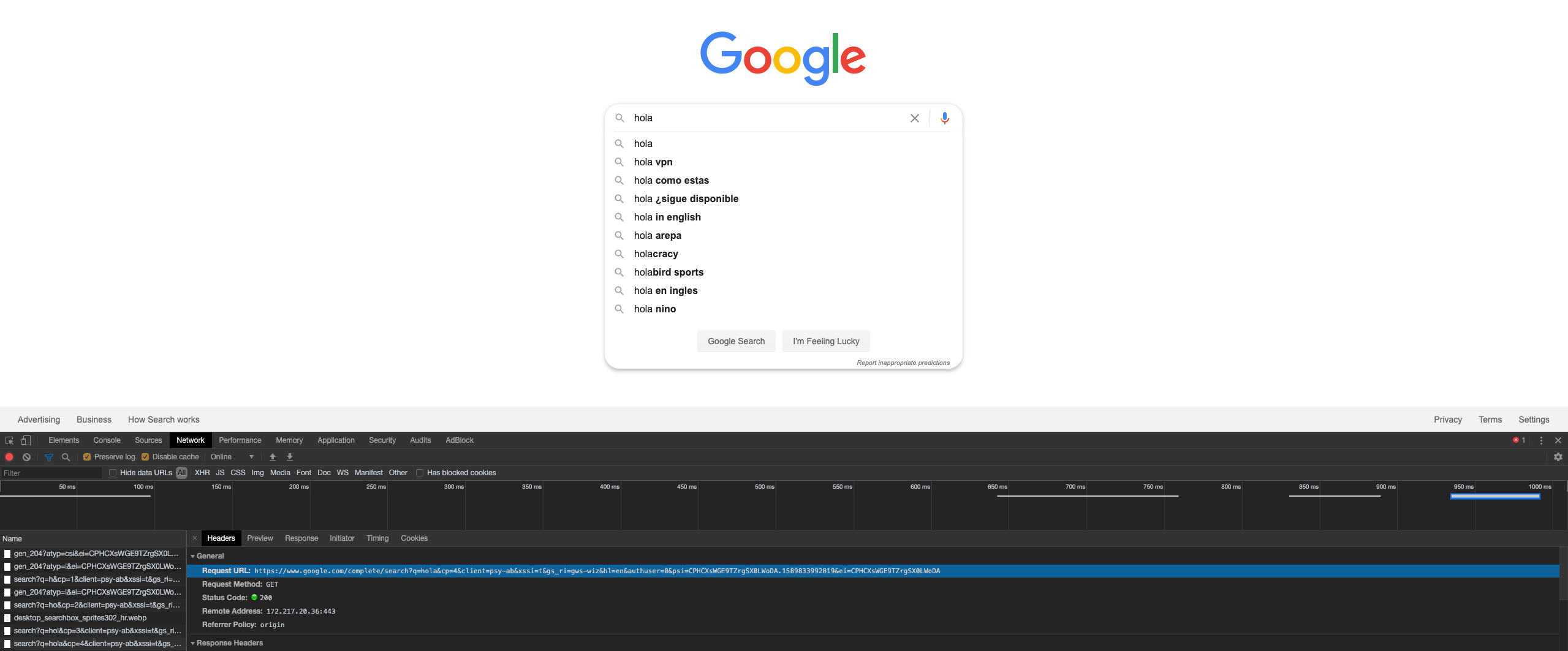
Using the Google Seach, I noticed that it does a Get request to this URL https://www.google.com/complete/search?q=hola in order to get the autocomplete options.
Google search request.
But if I try to do the same request from different website with a piece of code similar to this:
Access to fetch at 'https://www.google.com/complete/search?q=hola' from origin 'https://www.winnercrespo.com' has been blocked by CORS policy: No 'Access-Control-Allow-Origin' header is present on the requested resource. If an opaque response serves your needs, set the request's mode to 'no-cors' to fetch the resource with CORS disabled.
]]>Winner Crespowistcc@gmail.comWhat is camelCase, PascalCase, kebab-case and snake_case?2020-05-13T00:00:00+00:002020-05-13T00:00:00+00:00https://winnercrespo.com/naming-conventionsSince we cannot define a variable like fruits in basket because many (or maybe all) programming languages will interpret the space character as the end of the identifier and the beginning of something else, we need to do something like fruitsInBasket.
Camel, pascal, kebab and snake case (and others) are all naming conventions that we use in computer programming to be able to create compound names for variables, types, functions, clases and other structures in source code.
camelCase
The rules are that we capitalize all the words after the first one.
Raw
camelCase
fruits in basket
fruitsInBasket
has error
hasError
is visible
isVisible
Camel case is commonly used for variables and functions in JavaScript.
PascalCase
Here we need to capitalize all the words including the first one.
Raw
camelCase
PascalCase
fruits in basket
fruitsInBasket
FruitsInBasket
has error
hasError
HasError
is visible
isVisible
IsVisible
PascalCase is often preferred by C programmers.
kebab-case
For this one, we add a dash between each word and all of them are lowercase.
Raw
camelCase
PascalCase
kebab-case
fruits in basket
fruitsInBasket
FruitsInBasket
fruits-in-basket
has error
hasError
HasError
has-error
is visible
isVisible
IsVisible
is-visible
HTML5 attributes can start with data- like data-name. Also, CSS uses dashes in property-names like background-color.
snake_case
In contrast to the kebab case, for the snake case we add an underscore instead.
Raw
camelCase
PascalCase
kebab-case
snake_case
fruits in basket
fruitsInBasket
FruitsInBasket
fruits-in-basket
fruits_in_basket
has error
hasError
HasError
has-error
has_error
is visible
isVisible
IsVisible
is-visible
is_visible
Many programmers use underscores especially in SQL databases for things like creation_date, company_name, etc.
Some benefits that naming conventions bring are:
Consistency. Since naming something is one of the hardest jobs of a programmer, at least we can agree on a convention and be consistent about it.
Better understanding. Compound names explain a lot better than one word or one character the purpose of the structure.
Readability. Enhances the ability to read the code.
Automation. Enables the use of automated refactoring and search and replace tools.
]]>Winner Crespowistcc@gmail.comChart xkcd vue wrapper2019-08-30T00:00:00+00:002019-08-30T00:00:00+00:00https://winnercrespo.com/chart-xkcdA friend shared this great library the other day and I fell in love with it automatically. It’s very beautiful the way these charts look like they were hand-drawn.
It is also very easy to use, you only need to include the script tag on your page and add a svg element where the chart will be rendered. Learn more about it on the documentation.
I thought it would be cool to have a wrapper to use it very easy on my Vue projects but there were none at that moment so I decided to create my own chart.xkcd-vue-wrapper.
It’s also pretty easy to use, you just need to install it yarn add chart.xkcd-vue-wrapper or npm i chart.xkcd-vue-wrapper and then use the components like this:
<template><divid="app"><ChartLine:config="line"/><ChartBar:config="bar"/><ChartPie:config="pie"/></div>
</template>
<script>import{ChartLine,ChartBar,ChartPie}from'chart.xkcd-vue-wrapper';exportdefault{name:'App',components:{ChartLine,ChartBar,ChartPie,},data:function(){return{line:{title:'Bugs to fix in a sprint',xLabel:'Day',yLabel:'Bugs',data:{labels:['1','2','3','4','5','6','7'],datasets:[{label:'Plan',data:[1,2,3,4,5,6,7],},{label:'Reality',data:[0,0,0,0,0,0,7],}]},},bar:{title:'Bugs your coworker fixes vs you',data:{labels:['your coworker','you'],datasets:[{data:[100,2],}]},},pie:{title:'Bugs you create vs your whole team',data:{labels:['you','your team'],datasets:[{data:[100,2],}]}},};},}</script>
I hope that you like using beautiful and funny charts on your projects and that this wrapper is useful for you.
Happy coding!
]]>Winner Crespowistcc@gmail.comBooks I have read: first semester 20182018-07-24T00:00:00+00:002018-07-24T00:00:00+00:00https://winnercrespo.com/books-i-have-read-first-semester-2018Let’s be honest, I haven’t been a reader person my entire life. Sure, I’ve read tons of blog post, short stories, and a lot of tweets, but just the idea of start reading a book scared me. For some reason, I always found it a very boring activity.
However, I know the great benefits this could bring to me. This year I decided to make this a habit in my life. Today I want to share with you the books I read this first semester of the year.
I love this book. Once I started reading it, I wasn’t able to stop until the end.
The world is a chaotic place in the year 2045 and people get to escape this reality using the OASIS, a virtual reality game. Some hidden puzzles can give someone massive power and fortune. This cannot end into the wrong hands or everyone could lose the freedom this new world provides.
After loving Ready Player One, I decided to read another book by the same author. Armada is a very engaging story where the Zack Lightman gets to use his knowledge in science fiction books, movies, and video games to try to save the world.
Thanks to this book I was able to create the habit of doing a to-do list starting the day, giving priority to the most important things and also to not forget others through the day. This helps me get more things done every day.
In order to achieve big goals, you need to start taking massive actions since operating in normal action won’t get you there. Discover the reasons why people fail and others succeed, among other things.
Following the principles explained by the author, you could get richness in any aspect of your life that you want. These principles will help you to convert your burning desire in its material form.
I would love to get some book recommendations in the comments. Also, if you have already read the books I mentioned, let me know what you think about them.
]]>Winner Crespowistcc@gmail.comHow working remotely changed my life2018-07-19T00:00:00+00:002018-07-19T00:00:00+00:00https://winnercrespo.com/how-working-remotely-changed-my-lifeWhen I started working remotely on my full-time job my life changed. I had worked remotely before but only on part-time jobs that I worked on at night and I actually wasn’t getting the benefits of it.
Working from home has made me happier and a lot more productive. Although, not everything is always good. Let’s review some advantages and disadvantages I have experienced myself working remotely.
Upsides
:oncoming_automobile: No commute. I mention this one first because coming to the office was my bigger problem. I used to waste between an hour and an hour and a half to get to the office but on a bad day that could become MORE THAN TWO HOURS on a traffic jam. To be honest, I don’t really like to drive and taking this amount of traffic EVERYDAY to get to the office and the same struggle to get back home was making me sick. I always started my day with a grumpy face which doesn’t let me enjoy my day at all.
If more people start working from home, maybe those traffic jams could even disappear.
:sparkles:We should always dream big!:sparkles:
:apple: Better health. Frequently, I found myself eating fast food and most of the time the reason was that I didn’t find anything else, and I say most of the time because who doesn’t like fast food? :wink:
Now I cook my own meal almost every day which let me eat healthier.
Going to the gym has actually been harder since I have to get out to get there and usually get some traffic (did I already say I don’t like to drive?). Before I was subscribed to a gym which was less than 5 minutes from work and I used to go every day after work hours.
However, I still go every day to the gym and sometimes I also wake up earlier and go for a run in the neighborhood.
:computer: Improve productivity. Not being at the office reduces the possible distractions you could get from a coworker, hence I get to stay longer in the zone.
:palm_tree: You can work anywhere. And for this, I mean for any company and from any place in the world. My current employer is based in the US which wasn’t an option for me before. Also, I’ve done some long trips to different countries and that hasn’t stopped me to keep getting things done.
:moneybag: More money in the piggy bank. Since you don’t need to commute anymore you will save those expenses which usually tend to be pretty high. Also, you don’t have to spend money on office clothes, I really dislike this style.
Downsides
:house: Sick of being at home. Since I am a home person, I don’t have this problem but I know many people that could go crazy.
However, I practice some things to prevent this, like going from time to time to a cafe or a friend’s house who also works remotely.
:video_game: Distractions. Even though you eliminate the office distractions, you get others which are even harder to prevent. At home, you have your family, your bed, the tv, the game console, among other things which could easily get you interrupted.
I had to tell my family that when the door of my office is closed I shouldn’t be distracted too much and they learned it very fast. I also created specific schedules to use the amenities of the house so I don’t end up investing the whole day on them.
:date: Lack of routine. On most of the remote works, you have the flexibility to choose when to work and not necessarily have a routine.
This is fatal for me. I have to define a very specific schedule to get work done, if not I could procrastinate very easily. What works best for me is to dedicate 8 hours straight for work. Of course, if I have to go out in the middle of the day to run some errands I’ll do it and then complete my work-day after.
:sunglasses: Work/life balance. There’s a very thin line that divides work from life and this could make you work more or work less. It could be hard to stop working since you don’t have to get your things at 5 pm to go home, or to start working since you don’t need to get prepared to go to the office.
Having a specific time to do my job (as I explained before), has helped me not cross this line. I start and finish to work every day at the same time.
As everything in life, working remotely doesn’t work for everyone. I encourage you to try it out if you haven’t so you can feel the differences by yourself and then you have the needed experience to know what is best for you.
If you want to learn more about this, I would recommend you to read this book Remote: Office Not Required by David Heinemeier Hansson aka DHH. Please leave in the comments how working remotely has changed your life positively or negatively, I would love to read your story.
]]>Winner Crespowistcc@gmail.comThe power of saying thank you2018-07-13T00:00:00+00:002018-07-13T00:00:00+00:00https://winnercrespo.com/the-power-of-saying-thank-youWe are always getting better in our hard skills so we can be a better professional or to be able to contribute more and in a more effective way to the project, but how much time do we invest improving our soft skills to accomplish the same goal?
One very important thing of the job is to feel good with the company’s culture, with how the team socializes with each other every day, with how collaborative everyone is, and we play a key role in making this a success.
Today I just want to encourage you to do a very simple and not time-consuming thing that could create better relationships between everyone in the company: Just say thank you.
Our parents have taught us since we even couldn’t speak to say thank you constantly, but we forgot to do it frequently or simply we find it hard to do and just ignore it.
Thanking another person has the effect of making him/her feel appreciated, feel that what he/she does is important to others. This could increase their desire to keep doing it and in many cases even to improve it.
It is very usual to happen when the relationship is boss -> team member since the regular flow of work is that the boss asks for something and the team member creates a solution for it, so the boss says thanks for the obtained results. Is the same between coworkers, when someone helps another to understand something (for example) and after that he/she says thanks. However, even in those very straightforward situations we sometimes fail to thank the other person for his/her hard work.
In others kind of relationships seems a bit harder to do this, like team member -> boss but I am very sure that most of the time there is always something to be grateful for. Maybe he/she is a good communicator, is very motivator, has a lot of confidence in you, is a good mentor to you, does a lot of things that benefit the team, is very organized, give you autonomy, has a good vision, among other characteristics. Say thank you for that.
I practice this myself and I can tell you it could have a positive impact. Once I found myself thinking about all the great things my boss does every day and how amazing he is, most of those things don’t affect me directly but still those are very important things that improve the company. Out of the blue, I sent him a very short and precise text saying thank you for his hard work, he was surprised to receive this message and told me that at this moment he was dealing with so much and that this makes him feel better and be more enthusiastic about his work.
Of course, this depends on everyone personality. When you do this two things could happen: you see the results immediately or nothing. When nothing happens don’t get discouraged, just keep doing it, you will get to see the results later.
So, just say thank you every now and then, be very honest while doing it and you will perceive how the company’s culture keeps getting better every day.
Let me know anything I didn’t mention here, and also if you have any experience yourself in the topic share it in the comments.